
Beginner Tutorial - Using the Real Machine - Cloud Platform or SDK#
Use case description#
The whole process from modeling, submitting Qubo matrix to the cloud platform, and obtaining calculation results from the cloud platform is demonstrated through the Traveling Salesman Problem (TSP).
Method 1: Upload QUBO matrix calculation through the cloud platform#
Code modeling and generating qubo matrix#
 1import numpy as np
 2import pandas as pd
 3import kaiwu as kw
 4
 5
 6def is_edge_used(var_x, var_u, var_v):
 7    """
 8    Determine whether the edge (u, v) is used in the path.
 9
10    Args:
11        var_x (ndarray): Decision variable matrix.
12
13        var_u (int): Start node.
14
15        var_v (int): End node.
16
17    Returns:
18        ndarray: Decision variable corresponding to the edge (u, v).
19    """
20    return kw.core.quicksum(
21        [var_x[var_u, j] * var_x[var_v, j + 1] for j in range(-1, n - 1)]
22    )
23
24
25if __name__ == "__main__":
26    # Import distance matrix
27    w = np.array([[0, 1, 2], [1, 0, 0], [2, 0, 0]])
28    # Get the number of nodes
29    n = w.shape[0]
30
31    # Create qubo variable matrix
32    x = kw.core.ndarray((n, n), "x", kw.core.Binary)
33
34    # Get sets of edge and non-edge pairs
35    edges = [(u, v) for u in range(n) for v in range(n) if w[u, v] != 0]
36    no_edges = [(u, v) for u in range(n) for v in range(n) if w[u, v] == 0]
37
38    qubo_model = kw.core.QuboModel()
39    # TSP path cost
40    qubo_model.set_objective(
41        kw.core.quicksum([w[u, v] * is_edge_used(x, u, v) for u, v in edges])
42    )
43
44    # Node constraint: Each node must belong to exactly one position
45    qubo_model.add_constraint(x.sum(axis=0) == 1, "sequence_cons", penalty=5.0)
46
47    # Position constraint: Each position can have only one node
48    qubo_model.add_constraint(x.sum(axis=1) == 1, "node_cons", penalty=5.0)
49
50    # Edge constraint: Pairs without edges cannot appear in the path
51    qubo_model.add_constraint(
52        kw.core.quicksum([is_edge_used(x, u, v) for u, v in no_edges]),
53        "connect_cons",
54        penalty=20,
55    )
56
57    qubo_mat = qubo_model.get_matrix()
58    pd.DataFrame(qubo_mat).to_csv("tsp.csv", index=False, header=False)
Log in to the cloud platform to upload the matrix#
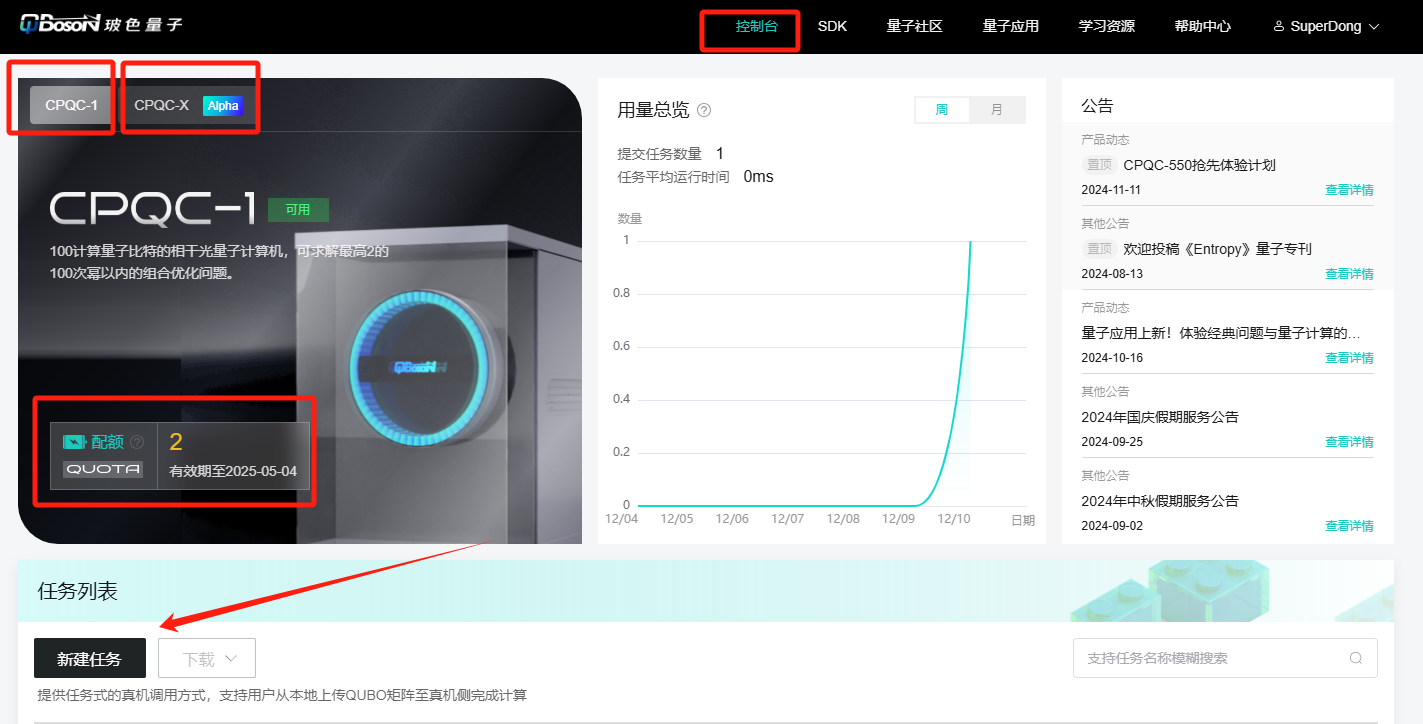
After logging in to the special-purpose quantum cloud computing platform, enter the console, select the hardware, and click Create Task
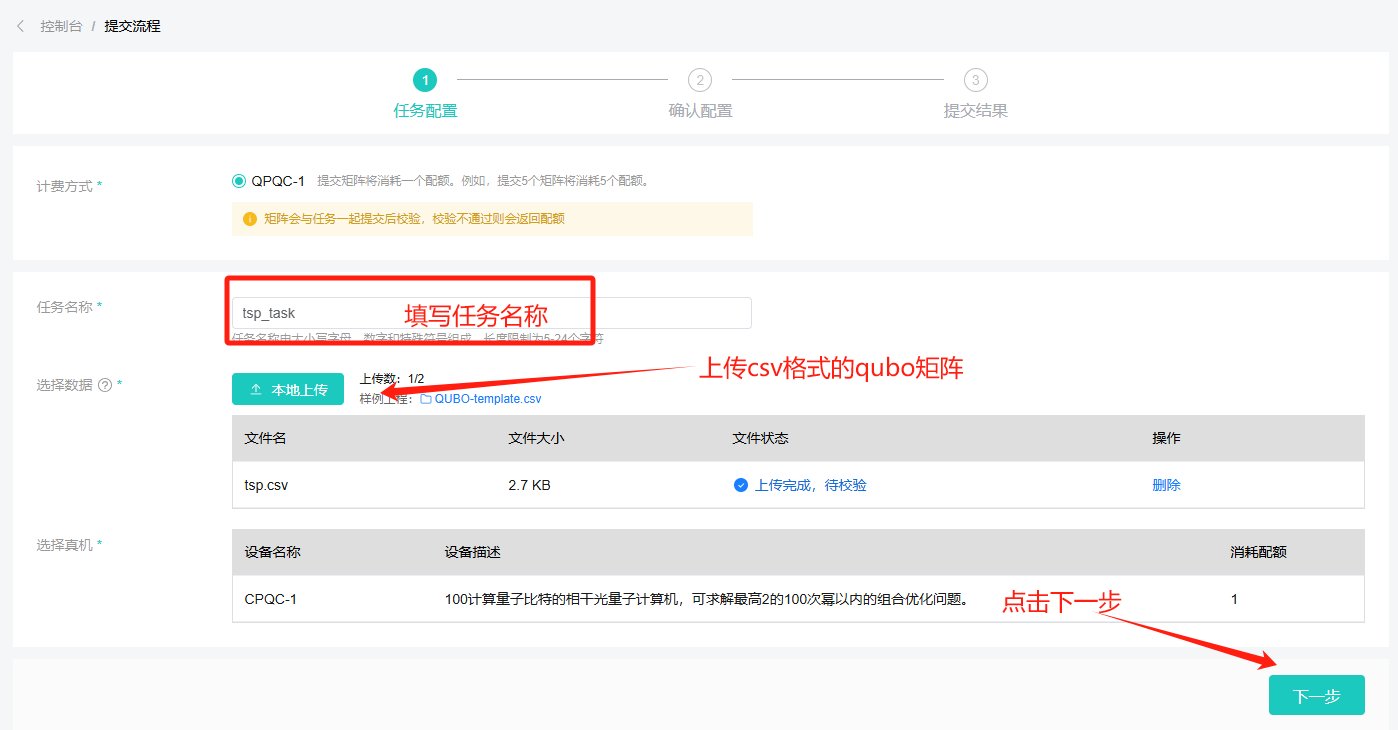
After entering the task configuration page, fill in the task name, upload the matrix, and click Next after confirmation.
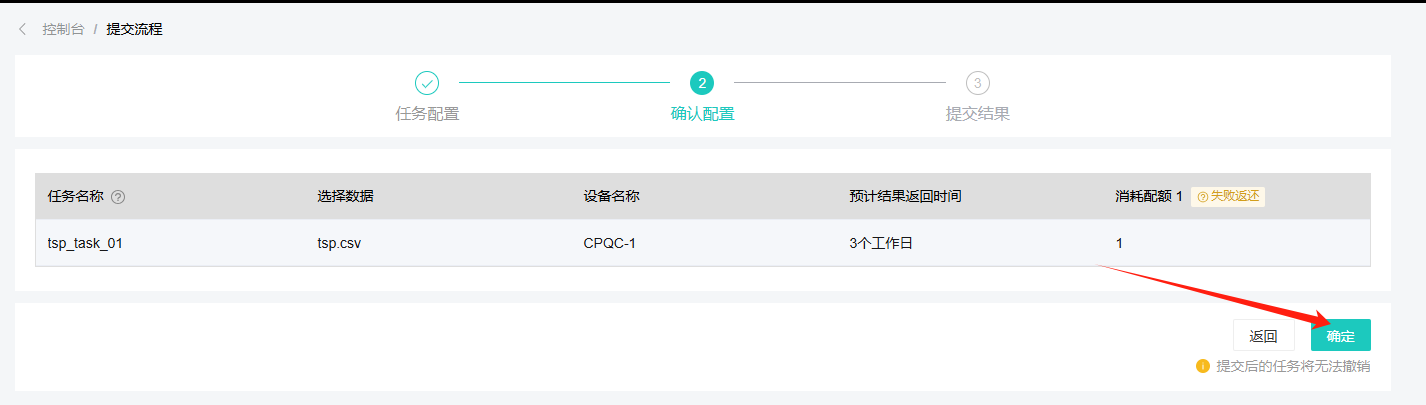
Enter the Confirm Configuration page, confirm the task and real machine information, and click the OK button
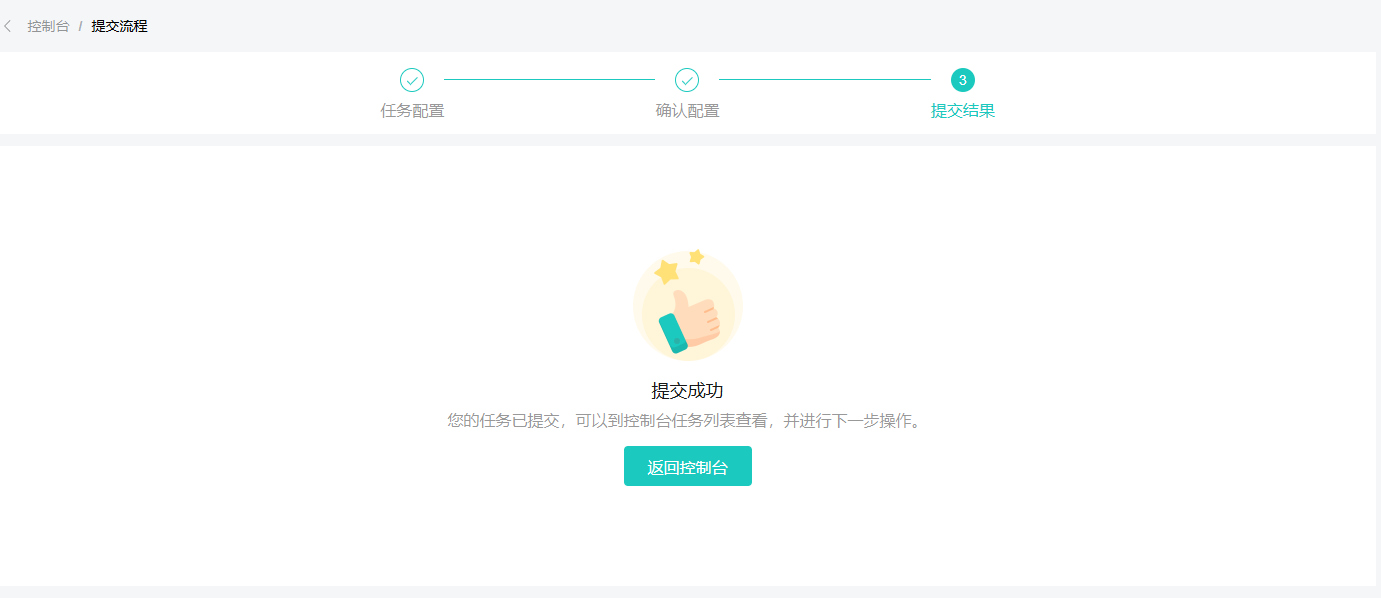
Enter the task submission page, and it will show that the submission is successful.
Return to the console, the task is being verified

After verification is successful, the task enters the queued state

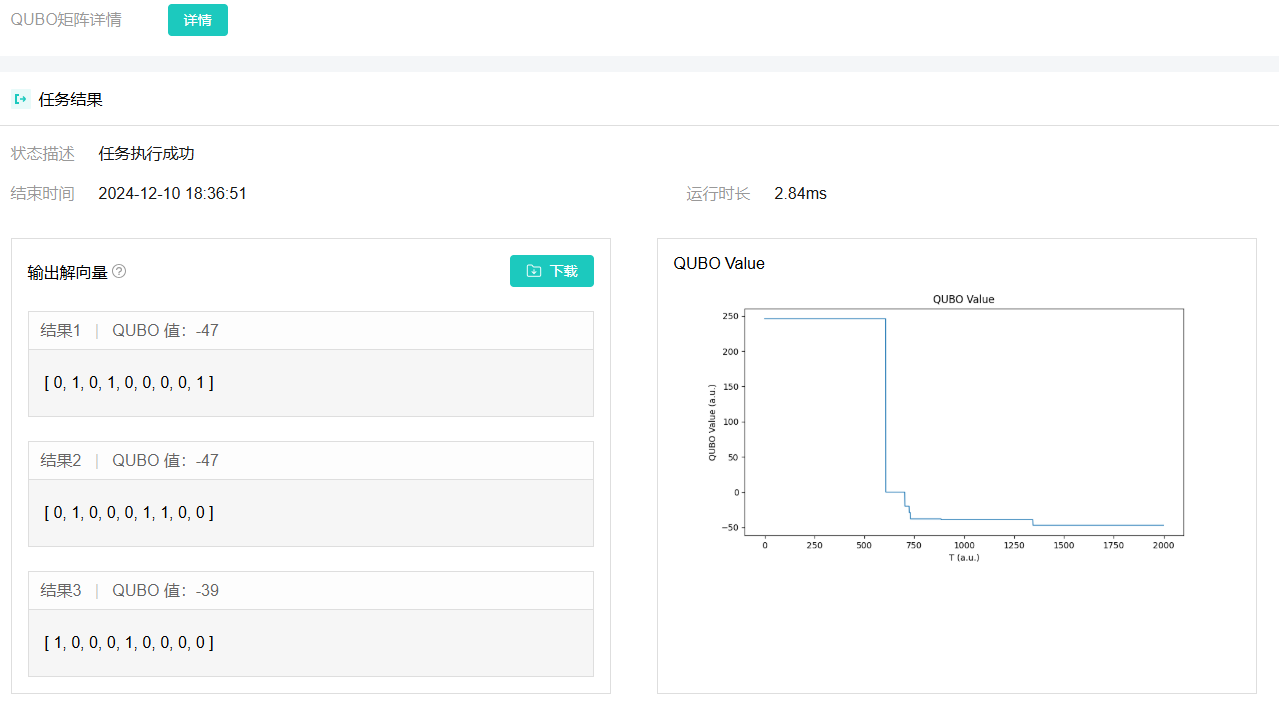
After the task is completed, click Details to enter the result details page

View result details (qubo solution vector, qubo value evolution curve, task execution time, etc.)
Method 2: Directly use the SDK to call the real machine#
The following is an example of using the SDK to directly call the real machine to solve the same TSP problem.Since quantum computers have precision limitations, the PrecisionReducer that comes with the SDK is used for precision adaptation in the example. Want to know more about precision,
See also
 1import numpy as np
 2import kaiwu as kw
 3
 4from kaiwu.cim import TaskMode
 5from kaiwu.common import CheckpointManager as ckpt
 6
 7
 8# Define edges using conditional functions
 9def is_edge_used(var_x, var_u, var_v):
10    """
11    Determine whether the edge (u, v) is used in the path.
12
13    Args:
14        var_x (ndarray): Decision variable matrix.
15
16        var_u (int): Start node.
17
18        var_v (int): End node.
19
20    Returns:
21        ndarray: Decision variable corresponding to the edge (u, v).
22    """
23    return kw.core.quicksum(
24        [var_x[var_u, j] * var_x[var_v, j + 1] for j in range(-1, n - 1)]
25    )
26
27
28if __name__ == "__main__":
29    # Set the save path for intermediate files
30    kw.common.CheckpointManager.save_dir = "/tmp"
31    # Define distance matrix
32    w = np.array(
33        [
34            [0, 0, 1, 1, 0],
35            [0, 0, 1, 0, 1],
36            [1, 1, 0, 0, 1],
37            [1, 0, 0, 0, 1],
38            [0, 1, 1, 1, 0],
39        ]
40    )
41
42    n = w.shape[0]  # Number of nodes
43
44    # Create a QUBO variable matrix (n x n)
45    x = kw.core.ndarray((n, n), "x", kw.core.Binary)
46
47    # Generate the set of edges and the set of non-edges
48    edges = [(u, v) for u in range(n) for v in range(n) if w[u, v] != 0]
49    no_edges = [(u, v) for u in range(n) for v in range(n) if w[u, v] == 0]
50
51    # Initialize the QUBO model
52    qubo_model = kw.core.QuboModel()
53
54    # Set the objective function: minimize path cost
55    path_cost = kw.core.quicksum([w[u, v] * is_edge_used(x, u, v) for u, v in edges])
56    qubo_model.set_objective(path_cost)
57
58    # Add constraints
59    # Node constraints: Each node must occupy one position
60    qubo_model.add_constraint(x.sum(axis=0) == 1, "node_cons", penalty=5.0)
61
62    # Location constraint: Each location must have at least one node.
63    qubo_model.add_constraint(x.sum(axis=1) == 1, "pos_cons", penalty=5.0)
64
65    # Edge constraint: Non-connecting edges must not appear
66    qubo_model.add_constraint(
67        kw.core.quicksum([is_edge_used(x, u, v) for u, v in no_edges]),
68        "edge_cons",
69        penalty=5,
70    )
71
72    # Configure the solver
73    ckpt.save_dir = "./tmp"
74    optimizer = kw.cim.CIMOptimizer(task_name="tsp", task_mode=TaskMode.OPTIMIZATION)
75    optimizer = kw.preprocess.PrecisionReducer(optimizer, 8)
76    sol_dict, qubo_val = optimizer.solve_qubo(qubo_model)
77
78    if sol_dict is not None:
79        # Verification Results
80        unsatisfied, res_dict = qubo_model.verify_constraint(sol_dict)
81        print(f"Number of unsatisfied constraints: {unsatisfied}")
82        print(f"constraint value: {res_dict}")
83
84        # Calculate path cost
85        path_cost = kw.core.get_val(qubo_model.objective, sol_dict)
86        print(f"Actual path cost: {path_cost}")
87    else:
88        print("Try again later")